
Waitlist Information
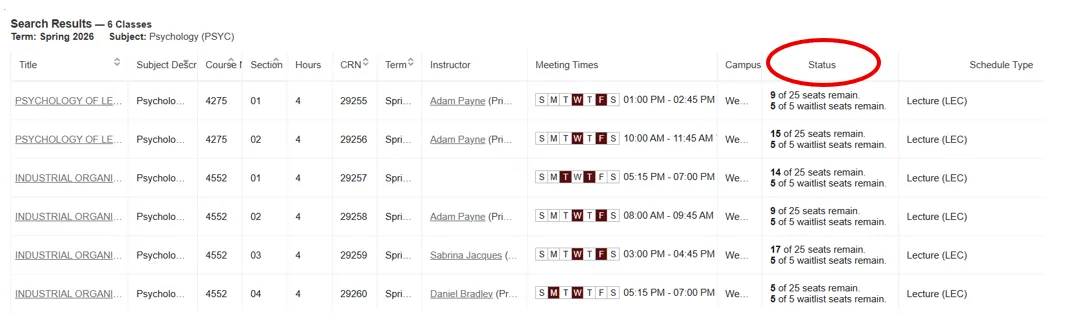
Some class sections will have the option to join a waitlist for the class if it is full. You can see the waitlist information in LeopardWeb when you are searching for classes:
If the desired class has a waitlist, available waitlist seats remain will be shown under Status.
If you join a waitlist and a spot opens up in the class, you will receive an email at your Wentworth email address from the Registrar’s Office with the subject “Waitlist Notification for CRN.”
Once this email is sent, you will have 48 hours to register for the class. If no action is taken during these 48 hours, you have lost your opportunity to join the class, and the next student on the waitlist will be offered the seat in the class.
- No exceptions will be granted if you miss the 48-hour window; it is your responsibility to check your email and register for the class before the deadline.
If the waitlist option is still available after you miss the deadline, you may rejoin the waitlist by dropping the course and then re-adding yourself to the waitlist. At this point, you would be added to the end of the waitlist.
Click here for step-by-step instructions on how to use the waitlist.